Work from home once felt temporary. Now, for many professionals, it’s permanent.
No commute. Flexible schedules. Comfortable clothes. More time with family. On paper, remote work sounds perfect.
But there’s one quiet downside most people ignore: the way we sit while working.
Sofas. Beds. Dining tables. Floor cushions. Laptops on knees. Phones held low. Hours pass. Days pass. Months pass.
And slowly, your body starts to protest.
According to spine specialists like Dr Naveen Pandita, poor posture during work-from-home routines is leading to a sharp rise in neck pain, lower back problems, tight shoulders, wrist strain, and even headaches — especially among people in their 20s and 30s.
The problem isn’t remote work.
It’s how casually we treat our bodies while doing it.
Why Your Dining Table (or Bed) Is Not a Real Desk
A dining table is designed for short meals.
A sofa is designed for relaxation.
A bed is designed for sleep.
None of them are built for 8–10 hours of focused work.
When you work from these surfaces:
- Your screen is usually too low.
- You hunch forward.
- Your lower back loses support.
- Your wrists bend unnaturally.
- Your neck tilts downward for long periods.
At first, it feels harmless. Comfortable, even.
But posture damage builds slowly.
One stiff day becomes weekly discomfort.
Then it becomes chronic pain.
The Most Common WFH Pain Problems Doctors See
Spine specialists report a noticeable rise in:
1. Lower Back Pain
Sitting without lumbar support increases pressure on spinal discs.
2. Neck Pain (“Tech Neck”)
Looking down at laptops or phones strains neck muscles.
3. Shoulder Tightness
Rounded posture overloads shoulder and upper back muscles.
4. Wrist Pain
Improper keyboard height can lead to strain and even early signs of carpal tunnel.
5. Headaches
Tight neck muscles often trigger tension headaches.
Many young professionals are now experiencing pain that used to appear much later in life.
Why Poor Posture Affects More Than Just Your Back
Posture isn’t just about bones and muscles.
Bad sitting habits can affect:
- Breathing – Slouching compresses the lungs.
- Digestion – Pressure on the abdomen slows processes.
- Circulation – Long sitting reduces blood flow.
- Focus – Physical discomfort reduces productivity.
Ironically, a poor setup makes work harder — not easier.
When WFH Pain Becomes a Real Problem
Occasional stiffness is normal.
But it becomes serious if:
- Pain lasts more than 3–4 weeks
- Discomfort spreads to arms or legs
- You feel numbness or tingling
- You notice weakness
- Morning stiffness lasts over 30 minutes
- Sleep is disturbed because of pain
These may signal deeper spine stress or disc issues.
Early action prevents long-term damage.
The Biggest Work-From-Home Mistakes
Most people don’t realize they are:
- Sitting for 3–4 hours without standing
- Working with screens below eye level
- Using chairs with no lower back support
- Crossing legs for long periods
- Working from bed regularly
- Skipping movement breaks
WFH often removes natural movement. In offices, you walk to meetings, colleagues’ desks, or lunch areas. At home, everything is within arm’s reach.
Less movement = more stiffness.
Simple Fixes That Don’t Cost Much
You don’t need an expensive ergonomic chair to improve your setup.
Here are practical changes you can make today:
1. Raise Your Screen to Eye Level
Use books or a laptop stand so your eyes look straight ahead — not down.
2. Keep Feet Flat on the Floor
If your feet dangle, use a box or footrest.
3. Support Your Lower Back
Roll a towel and place it behind your lower spine.
4. Follow the 30–40 Minute Rule
Stand up, stretch, or walk briefly every 30–40 minutes.
5. Use an External Keyboard (If Possible)
This allows proper screen height without straining wrists.
6. Switch Positions During Calls
Stand during phone meetings. Move around.
Small changes prevent major issues.
What an Ideal WFH Setup Looks Like
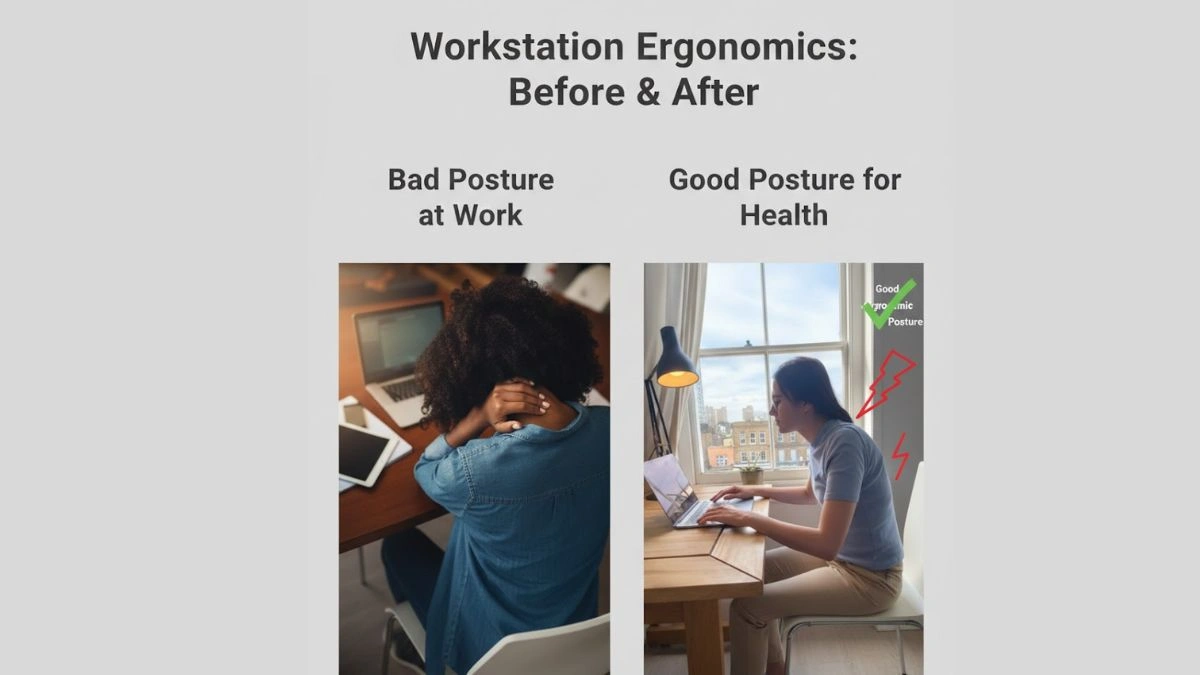
- Screen at eye level
- Elbows at 90 degrees
- Wrists straight
- Back supported
- Knees at hip level
- Feet flat
Your body should feel neutral — not twisted or collapsed.
Why Young Professionals Are at Higher Risk
People in their 20s and 30s often:
- Work longer screen hours
- Skip exercise
- Ignore early pain
- Assume discomfort is “normal”
But the spine remembers long-term stress.
Chronic poor posture can lead to:
- Disc degeneration
- Persistent muscle imbalance
- Reduced mobility
- Long-term pain conditions
Prevention is easier than treatment.
The Psychological Side of Physical Pain
Chronic discomfort affects mood.
It can lead to:
- Irritability
- Reduced concentration
- Fatigue
- Lower motivation
When your body feels uncomfortable, your brain never fully relaxes.
This impacts productivity and overall well-being.
Should You Invest in Ergonomic Furniture?
If you work remotely full-time, yes — eventually.
An ergonomic chair and adjustable desk are long-term investments in health.
But if that’s not possible right now, posture awareness and movement matter more than equipment.
Even the best chair won’t help if you sit for 10 hours straight.
When to See a Doctor or Physiotherapist
Seek medical advice if:
- Pain lasts more than 4–6 weeks
- Symptoms worsen despite adjustments
- You experience numbness or weakness
- Pain affects sleep or daily tasks
- You have bladder or bowel issues (urgent medical attention needed)
Early consultation prevents serious spine problems.
Work From Home Isn’t the Enemy
Remote work has benefits:
- Reduced commute stress
- Flexible schedules
- Better work-life balance
The issue isn’t working from home.
It’s ignoring posture for months or years.
WFH is here to stay.
So your body needs a setup that supports it.
Also Read : Working From Home: The Real Issue Isn’t Productivity
Final Thoughts
That dining table isn’t a desk.
That sofa isn’t an office chair.
And that bed is definitely not a workstation.
Your body adapts to how you treat it every day.
Work-from-home freedom is valuable — but not at the cost of your spine.
Make small adjustments now.
Because fixing posture is easier than fixing chronic pain later.
FAQs: Work-From-Home Posture & Pain
1. Is it okay to work from the dining table occasionally?
Yes. Occasionally is fine. Daily long hours are the real problem.
2. Can bad posture permanently damage the spine?
Over time, yes. Chronic poor posture can speed up disc wear and muscle imbalance.
3. How often should I take breaks?
Every 30–40 minutes. Even 2–3 minutes of movement helps.
4. Is standing better than sitting?
Alternating between sitting and standing is best. Too much of either isn’t ideal.
5. Why does my neck hurt more than my back?
Screens placed too low force your neck forward, increasing strain.
6. Can exercise reverse posture damage?
Exercise and physiotherapy can significantly improve posture-related pain if addressed early.
7. Are young people really at risk?
Yes. Doctors are seeing more posture-related issues in younger adults due to screen-heavy work.
8. Does posture affect productivity?
Absolutely. Physical discomfort reduces focus and energy.